 Isleday
Check off habits right from the Lock Screen
If you have to open a habit app to check something off, a few check-ins slip every day. Put it where you look first and it becomes a single tap.
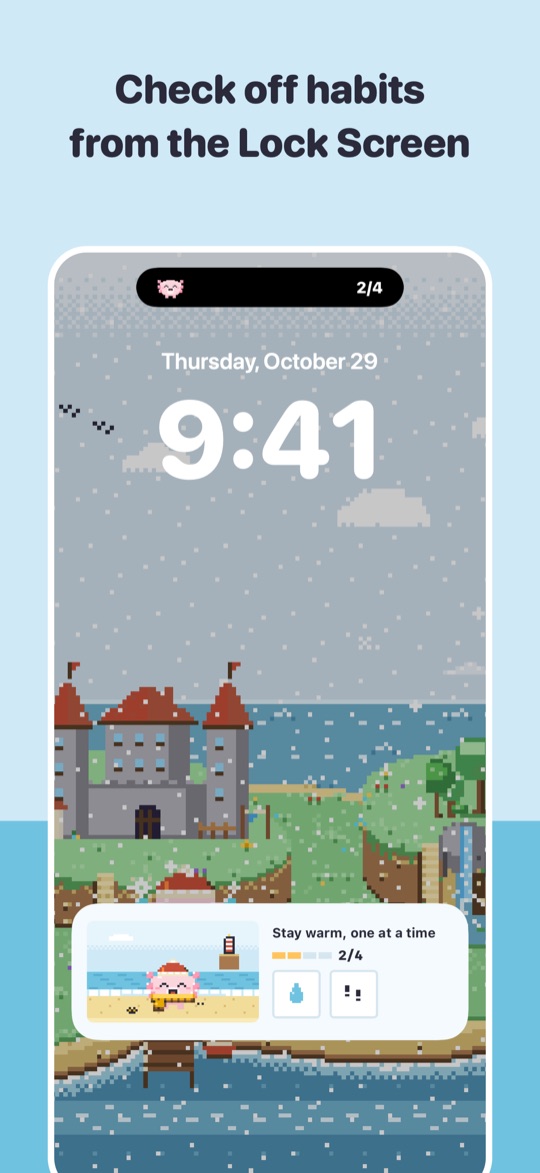
Add a Lock Screen widget
Available on iOS 17 and later.
- Touch and hold the Lock Screen, then tap Customize
- Choose the Lock Screen and tap the widget area
- Find Isleday and add the widget you want
- Tap the next-habit widget to check it off
Turn on Today's island
Today's progress and your next habit appear as a card on the Lock Screen and in the Dynamic Island. The card changes on rainy days, streak milestones and seasons.
- Open the ME tab in Isleday
- Under Notifications, turn on Today's island on Lock Screen
- Use the button on the card to check off your next habit
Home Screen widgets
Touch and hold the Home Screen, tap Edit › Add Widget and choose Isleday. Small, medium and large sizes check off habits with one tap.
Control Center (iOS 18 and later)
Add the Isleday control when editing Control Center to check off your next habit from there.
Apple Watch
With Isleday on your iPhone, install it from the Watch app. See today's habits on your wrist and check them off; your iPhone updates right away.
It all counts the same
Widget, Lock Screen, Watch or app: every check goes to the same record and grows the same island.